Dell 14 Plus First Look: Unboxing and Impressions
Introduction
The Dell 14 Plus arrives in a market that is increasingly crowded with high-performance ultraportables. Positioned as a more powerful alternative to the standard Inspiron series and a more attainable sibling to the premium XPS lineup, the "Plus" moniker suggests that this machine is designed for those who need more than just a basic productivity tool. It targets content creators, engineering students, and professional multitaskers who require a balance of portability and raw computational power. In this first look and detailed unboxing analysis, the focus remains on the tangible quality and initial performance metrics of a device that promises to bridge the gap between casual computing and heavy-duty workloads.
First impressions often dictate a user’s relationship with their technology. For many, the unboxing experience is the start of that journey. Dell has transitioned toward more sustainable packaging over the last several years, and the 14 Plus is no exception. Encased in a recycled cardboard exterior with minimal plastic usage, the laptop is presented in a way that feels professional yet environmentally conscious. Upon lifting the lid, the sleek, graphite-toned chassis of the laptop reveals itself, immediately signaling a departure from the plastic-heavy designs of budget-tier portables. This is a machine that feels dense and purposeful, signaling hidden power beneath its relatively compact 14-inch frame.
Detailed Product Analysis
Unboxing Experience and Build Quality
The physical unboxing of the Dell 14 Plus is a straightforward affair. Inside the box, users find the laptop itself, a compact power adapter—typically a USB-C based unit ranging from 65W to 90W depending on the specific internal configuration—and basic documentation. There are no superfluous accessories, which aligns with modern industry standards. The laptop's chassis is primarily constructed from aluminum, lending it a structural rigidity that resists flex during typing or when picking the device up by a single corner. The hinge tension is tuned for stability, though it requires two hands to open, a small trade-off for a screen that doesn't wobble during use.
The texture of the aluminum surface is smooth but not slippery, and it manages fingerprints reasonably well compared to many darker-colored magnesium alloys. The port selection is generous for a 14-inch device. Dell has included a mix of Thunderbolt 4 (USB-C), standard USB-A 3.2 Gen 1, an HDMI port, and a microSD card slot. For many buyers, the inclusion of a USB-A port is a significant win, as it eliminates the immediate need for dongles when connecting older peripherals or wireless mouse receivers. The headphone jack remains present, a small but essential inclusion for those who rely on high-fidelity wired audio for editing or focused work.
Display and Visual Performance
One of the primary selling points of the "Plus" variant is often the display. The 14-inch panel typically features a 16:10 aspect ratio, providing more vertical screen real estate than traditional 16:9 widescreen displays. This extra height is particularly beneficial for programmers looking at lines of code, writers managing long documents, and web browsers scrolling through data-heavy sites. Initial impressions of the screen reveal vibrant color reproduction and deep contrast ratios. Depending on the specific configuration, these displays often boast 2.2K or 2.8K resolutions, ensuring that text is tack-sharp and imagery is rendered with high fidelity.
Brightness levels are generally rated at 300 nits or higher, which is sufficient for indoor environments and shaded outdoor areas, though it may struggle under direct, harsh sunlight. The matte anti-glare coating is effective at reducing reflections from overhead office lights, making it a comfortable companion for long work sessions. For creators, the high sRGB coverage ensures that the colors seen on screen are accurate enough for social media content creation and digital design, though professional colorists may still prefer an external calibrated monitor for final mastering.
Keyboard, Trackpad, and User Interface
The keyboard on the Dell 14 Plus is characteristic of the modern Inspiron design language but often feels tighter and more responsive. Key travel is approximately 1.3mm to 1.5mm, providing a tactile "click" that aids in typing speed and accuracy. The layout is standardized, with no unconventional key placements that would hinder a fast typist. The backlighting is uniform across the keys, offering multiple brightness levels for working in dim environments. One subtle but appreciated feature is the power button, which typically doubles as a fingerprint reader, allowing for seamless, biometric logins through Windows Hello.
Looking for the best Laptops & Computers deals on Amazon?
Shop Amazon →The trackpad is significantly larger than those found on older 14-inch laptops. It is a precision touchpad, meaning it supports the full range of Windows 11 gestures with smooth tracking and reliable palm rejection. The click mechanism is integrated into the bottom portion of the pad, providing a satisfying physical feedback without feeling mushy. While it is not a haptic touchpad like those on the flagship XPS models, it represents an excellent implementation of mechanical clicking technology, remaining quiet yet communicative.
Internal Specifications and Thermal Management
Under the hood, the Dell 14 Plus is usually equipped with Intel Core H-series or the latest Ultra-series processors. This is a critical distinction from the U-series chips found in standard "thin and light" laptops. H-series chips are designed for higher sustained performance, making them suitable for video rendering, heavy data processing, and compiling code. These processors draw more power and generate more heat, which explains why the 14 Plus feels slightly thicker and heavier at approximately 3.5 pounds compared to ultra-lean machines. Dell has addressed the thermal requirements with a dual-fan cooling system and larger heat pipes.
During initial setup and software installation, the fans remain mostly silent. However, when pushed with intensive benchmarks or multitasking, the fans ramp up in a predictable, linear fashion. The sound profile is more of a "whoosh" than a high-pitched whine, making it less distracting in a library or office setting. The cooling vents are strategically placed to exhaust hot air away from the user’s hands, though the bottom of the device can become quite warm during extended periods of heavy load. Memory usually ranges from 16GB to 32GB of LPDDR5x RAM, which is soldered to the motherboard, while the NVMe SSD is generally user-replaceable, offering a path for storage expansion in the future.
Real-World Use Cases
For a university student, the Dell 14 Plus serves as an all-in-one workstation. An engineering student needing to run MATLAB or CAD software will benefit from the high-wattage processor, while a business student managing massive Excel spreadsheets will appreciate the vertical screen space and responsive keyboard. The laptop's portability means it fits easily into a standard backpack, and the rugged aluminum build provides peace of mind when moving between lectures or coffee shops.
Remote professionals will find value in the 14 Plus as a primary productivity hub. The built-in webcam is typically upgraded on these models, often featuring a 1080p sensor with temporal noise reduction to ensure clear video during Zoom or Microsoft Teams calls. Combined with a robust microphone array, the device is well-equipped for the modern "hybrid" work era. When docked to a single-cable Thunderbolt solution at home, it can power multiple 4K monitors and peripherals, effectively replacing a desktop tower for most administrative and creative tasks.
Pros & Cons
- Strong Build Quality: The aluminum chassis provides a premium feel and structural integrity that surpasses most plastic competitors in this price bracket.
- High-Performance Components: By utilizing H-series processors, the 14 Plus offers significantly better peak performance for demanding tasks than standard ultraportables.
- Excellent Port Selection: The inclusion of Thunderbolt 4, USB-A, and HDMI ensures compatibility with both modern and legacy hardware without needing adapters.
- Productive Aspect Ratio: The 16:10 display ratio is a boon for productivity, allowing more content to be visible vertically.
- User-Replaceable Storage: While RAM is fixed, the ability to upgrade the NVMe SSD allows for long-term storage flexibility.
- Weight Considerations: At roughly 3.5 lbs, it is heavier than some 14-inch rivals, which may be a factor for those prioritizing maximum portability.
- Thermal Throttling: Under extreme, sustained workloads, the compact chassis can lead to some clock-speed reduction to manage heat.
- Soldered Memory: The inability to upgrade RAM after purchase means buyers must be certain of their requirements at the time of checkout.
- Battery Life Variability: The more powerful H-series hardware can drain the battery quickly during intensive tasks, though it performs admirably under light productivity.
Comparison Table
| Feature | Dell 14 Plus | Standard 14-inch Ultraportable | Premium 13-14 inch Flagship |
|---|---|---|---|
| Processor Class | Intel H-Series / Ultra H | Intel U-Series / P-Series | Intel Ultra / Apple M-series |
| Chassis Material | Aluminum | Plastic or Hybrid | CNC Aluminum / Magnesium |
| Display Ratio | 16:10 | Usually 16:9 or 16:10 | 16:10 or 3:2 |
| Port Selection | High (TB4, USB-A, HDMI) | Moderate (USB-C, USB-A) | Focus on USB-C/Thunderbolt |
| Weight | ~3.5 lbs | ~3.0 lbs | 2.4 - 3.0 lbs |
| Target User | Power User / Creator | Student / Casual Office | Executive / Creative Pro |
Buying Guide: Is the Dell 14 Plus Right for You?
When deciding whether to invest in the Dell 14 Plus, the first question to ask is about your specific workload. If your daily routine consists entirely of web browsing, checking email, and watching streaming video, the additional power of the "Plus" model might be unnecessary. You might be better served by a lighter, standard Inspiron or a Chromebook that prioritizes battery life over raw speed. However, if you find your current laptop stuttering when you have 40 browser tabs open while simultaneously running Photoshop or a virtual machine, the Dell 14 Plus is precisely the upgrade you need.
Evaluating Performance Needs
The transition to Intel's latest silicon has redefined what a 14-inch laptop can do. Buyers should look for configurations with at least 16GB of RAM. In the modern Windows environment, 8GB is becoming the bare minimum for comfortable use, and since the memory on the 14 Plus is soldered, you cannot upgrade it later. Choosing 16GB or even 32GB ensures the laptop remains relevant for the next four to five years. Similarly, while the processor is powerful, ensure your software can actually utilize the extra cores. Multi-threaded applications like video compilers and 3D modeling programs will see the most benefit.
Discover deals on Laptops & Computers — updated daily.
Shop Amazon →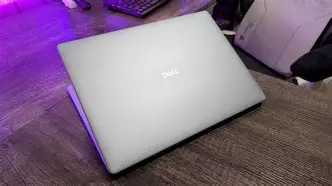
Considering the Screen
Dell often offers different screen options for the 14 Plus. While the base resolution is excellent, some users might be tempted by OLED panels or higher refresh rate screens. An OLED display provides perfect blacks and incredible color pop, which is fantastic for movie watching and photo editing, but keep in mind that OLED can consume more power when displaying bright office documents. A 90Hz or 120Hz refresh rate makes the entire operating system feel smoother—scrolling through web pages and moving windows becomes fluid—but this too has a small impact on battery runtime.
Battery and Portability Trade-offs
Portability is a relative term. In the world of high-performance laptops, many devices are 15 or 16 inches and weigh over 5 pounds. From that perspective, the Dell 14 Plus is exceptionally portable. However, compared to an MacBook Air or a Dell XPS 13, it feels noticeably more substantial. If you are a "digital nomad" who works from a new location every day, the extra half-pound might matter to you. If you are a student or office worker who moves between desks and occasionally travels, the weight is likely a non-issue. Regarding battery life, expect a full day of light productivity (6-8 hours), but keep your charger handy if you plan on doing some heavy video editing on the go.
Future Proofing
The inclusion of Thunderbolt 4 is a major factor in the long-term value of this laptop. This port allows for high-speed data transfer and docking capabilities that can keep your setup clean. More importantly, it supports external GPU (eGPU) enclosures. While the integrated graphics on the Dell 14 Plus are quite capable for light gaming and creative work, the ability to plug in a desktop-class graphics card in the future means this laptop could potentially serve as a gaming rig or a high-end rendering station if your needs change down the road.
Conclusion
The Dell 14 Plus stands as a testament to the fact that power and portability do not have to be mutually exclusive. By taking the best elements of the mainstream Inspiron line—affordability and practical port selection—and infusing it with the high-performance DNA usually reserved for larger workstations, Dell has created a versatile tool for the modern power user. It is a machine that feels built to last, with a rigid aluminum frame and a display that prioritizes productivity through its 16:10 aspect ratio.
While it is slightly heavier than some of its ultraportables peers, the trade-off in performance is tangible. The thermal management system allows the H-series processors to breathe, ensuring that the laptop doesn't just look fast on a spec sheet but actually performs under pressure. For the buyer who wants a reliable, powerful, and aesthetically pleasing laptop without the astronomical price tag of the "luxury" tier, the Dell 14 Plus is a compelling option. It successfully carves out a niche for professionals and students who demand more from their hardware, offering a balanced package that handles the rigors of modern computing with ease. As a "first look," the impressions are overwhelmingly positive, marking this device as a standout choice in the current laptop landscape.