The Ultimate Setup Guide for Your Google Pixel 10 Pro Fold
Category: Mobile Phones
Introduction
The Google Pixel 10 Pro Fold represents Google's most ambitious entry into the foldable phone category: a large, book-style folding display paired with Pixel's clean software, advanced computational photography, and years of promised Android updates. For buyers who want a device that can act as both a phone and a small tablet, the Pixel 10 Pro Fold aims to bridge productivity, content consumption, and camera performance in one package.
This guide walks through everything a new owner needs to know to set up the device and configure it for real-world use: unboxing and first-boot essentials, key settings to change, fold-specific tips, recommended accessories to protect the investment, practical workflows for multitasking and photography, and a buying guide to help prospective buyers decide if it fits their needs. The goal is to provide practical, unbiased advice that reflects what buyers typically care about—durability, daily battery life, camera quality, software longevity, and how well the fold actually improves productivity.
Unboxing and First Steps
The Pixel 10 Pro Fold arrives as a premium device; treat the initial moments like an important setup ritual. Before powering on, inspect the device and box contents for any shipping damage. Typical inclusions are the phone, USB-C cable, documentation, SIM tool, and possibly a simple charger. Keep the original box for at least a short period in case of returns or trade-ins.
Initial Boot and Account Setup
- Power on the device and follow the on-screen prompts to select language and connect to Wi‑Fi.
- Sign in with a Google account—this restores contacts, apps, and many settings if the user is migrating from another Android device.
- Set up biometrics: fingerprint and face unlock (if offered). For foldables, fingerprint placement and how the device sits when folded can affect convenience—register prints from both open and closed-hand positions where possible.
- Review privacy and backup options. Enable Google Backup for app data, Wi‑Fi passwords, and device settings to speed future restores.
Essential System Updates
After the first boot, immediately check for system and app updates. Pixel phones generally receive priority updates; installing the latest patches improves stability, camera algorithms, and battery optimizations. If a firmware update includes hinge or folding-display optimizations, install it before changing screen settings or using intensive apps.
Display and Fold-Specific Configuration
Foldables introduce new configuration choices that don't exist on standard phones. The Pixel 10 Pro Fold offers both an external cover screen for one-handed tasks and a large internal folding display for multitasking and media. Optimize both displays for daily use.
Cover Screen vs. Inner Tablet Screen
- Set a comfortable brightness and refresh-rate profile for each display. For battery savings, consider using adaptive refresh only on the inner screen for demanding content and lower refresh on the cover screen.
- Customize which apps open on the larger internal display automatically. Users who frequently read documents or edit spreadsheets will benefit from auto-expansion to the larger canvas.
- Enable continuity features that keep apps in the same state when switching between cover and inner displays—this preserves workflow when opening the device.
Managing the Crease and Screen Protection
The display crease is a physical reality on most folding OLED displays. Google likely minimized it, but users should accept a slight texture at the fold. Avoid pressing directly on the crease during use, and use gentle cleaning methods. For long-term protection:
- Install a compatible case designed for foldables to protect both the hinge and the displays from drops and scratches.
- Follow manufacturer guidance on screen protectors; improper application can interfere with fold behavior or cause bubbling at the crease.
Performance, Battery, and Thermal Tips
The Pixel 10 Pro Fold pairs high-end silicon with a large battery to meet the demands of a tablet-like display. That said, foldable form factors can trade off some battery capacity for compactness. To maximize daily runtime:
- Use adaptive battery features to restrict background usage for seldom-used apps.
- Turn on dark mode—AMOLED panels save power with dark themes, particularly on large inner displays.
- Enable Wi‑Fi calling and input carrier settings correctly to avoid poor signal causing higher power draw.
- When charging, use reputable high-power USB-C chargers and enable fast charging options if the user needs a quick top-up.
Thermals can affect performance during extended use (gaming, pro-level photography edits). If the device gets warm, closing background apps, lowering screen brightness, or temporarily disabling high-refresh rates will reduce heat and help sustain peak performance.
Camera System and Photography Workflow
Pixel phones are synonymous with computational photography. The Pixel 10 Pro Fold likely continues that trend with a multi-sensor array and advanced processing. For real-world photography:
Discover deals on Mobile Phones — updated daily.
Shop Amazon →- Explore "Pro" modes for manual control over ISO, shutter speed, and focus when shooting stills in complex lighting.
- Use the larger inner display as a viewfinder for tripod or low-angle shots for more precise framing—this is especially useful for long-exposure and product photography.
- Try multi-capture modes (HDR, Night) for low-light scenes; computational stacking benefits from steady support (use a small tripod or rest the folded device on a stable surface).
- Check camera stabilization and optical zoom behavior in video; for stable handheld recordings, calibrate gimbal or stabilization apps to the fold's center of mass.
Multitasking and Productivity Tips
Foldables shine for multitasking. Pixel devices often offer split-screen, freeform windows, and drag‑and‑drop between apps on the larger display. Set up these workflows:
- Create app pairs for common combinations (for example, email + calendar, or document + messaging).
- Use drag-and-drop to move images or text between apps quickly—this is particularly helpful for content creators and knowledge workers.
- Configure keyboard and input settings for comfort; explore floating keyboard options when using the inner screen like a small tablet.
- Use stylus support if available, especially for note-taking, annotation, and precise selection in editing apps.
Durability, Hinge Care, and Everyday Handling
Buyers frequently worry about the long-term durability of foldables—hinge life, ingress protection, and screen robustness. Practical guidelines:
- Avoid exposing the hinge to debris. When outdoors, be mindful of sand or dust around hinge points.
- Keep the device away from liquids; even with water resistance claims, foldable seals are more complex than single-piece phones.
- Don’t force the hinge beyond the intended open/close angles. The device is engineered to operate within specified tolerances.
- Use a certified repair provider for any hinge or screen issues—attempting DIY fixes on a foldable can worsen damage.
Pros & Cons
- Pros
- Large inner screen for multitasking and immersive media consumption.
- Pixel-grade computational photography and consistent software updates.
- Smooth Android experience with optimized continuity between cover and inner displays.
- Flexible productivity use-cases: split-screen, app pairs, stylus support (if available).
- Cons
- Higher cost compared with traditional flagship phones.
- Potential long-term durability concerns around the hinge and foldable display.
- Heavier and thicker than standard phones, which can affect pocketability and single-handed use.
- Accessory ecosystem (cases, screen protectors) can still be catching up to demand.
Side-by-side Comparison
The table below compares the Pixel 10 Pro Fold with two leading foldable competitors to help buyers weigh trade-offs. The values emphasize generational differences buyers typically care about: display size, multitasking features, camera capability, battery life, and software update promise.
| Model | Inner Display | Cover Display | Camera Highlights | Battery & Charging | Software & Updates | Best for |
|---|---|---|---|---|---|---|
| Google Pixel 10 Pro Fold | Large foldable OLED (tablet-like, high refresh) | Handy one-handed OLED with adaptive refresh | Computational photography, multi-sensor array, advanced Night modes | Large battery tuned for dual displays, fast wired charging | Long-term Android updates and security patches | Users who want Pixel camera quality with foldable productivity |
| Samsung Galaxy Z Fold (Latest) | Large foldable AMOLED, S Pen support on some models | Full-featured cover display | Versatile camera system, strong video performance | Large battery, wireless charging on many models | Extended Android support, deep multitasking features | Power users who value stylus workflows and strong multitasking |
| Other Foldable Flagship | Compact inner display (varies by model) | Practical cover screen | Competitive cameras, often strong hardware specs | Varying battery capacity, emphasis on compact design | Software update cadence may differ by manufacturer | Buyers focused on design or price-performance trade-offs |
Practical Accessories and Non-Affiliate Recommendations
While avoiding any specific purchase links, new owners should consider the following accessory categories to protect and extend the usability of a foldable device:
- Hinge-friendly protective case — one designed for folds to absorb shocks without restricting movement.
- High-quality screen protector specifically made for the inner folding display, applied by a professional if recommended.
- Compact USB-C charger and cable that support the device's fast-charging profile, plus a car charger for frequent travelers.
- Stylus (if supported) from reputable manufacturers for note-taking and precision input.
- Small tripod or phone grip to stabilize the larger form factor during photography or video calls.
Buying Guide: Is the Pixel 10 Pro Fold Right for the Buyer?
Buying a foldable is often a trade-off between versatility and cost/complexity. Here are the factors to weigh:
1. Use Case
If the buyer frequently reads long documents, edits spreadsheets on the go, multitasks with three or more windows, or prioritizes a larger screen for content creation, a foldable provides clear advantages. For buyers who primarily use social apps, single-handed browsing, and prefer lighter devices, a conventional flagship may be a better fit.
2. Durability Expectations
Consider the buyer’s tolerance for potential long-term maintenance. If they need a device to withstand rough handling, check warranty terms, available service centers, and user reviews focusing on hinge longevity and screen durability.
3. Camera and Media
Buyers who prioritize mobile photography will appreciate the Pixel's computational strengths. Compare sample images and videos in real-world lighting conditions, focusing on low-light performance and stabilization during video capture.
4. Price and Value
Foldables command a premium. Evaluate whether the productivity and media benefits justify the higher cost compared with similarly spec’d non-foldable flagships. Factor in accessory costs and potential insurance or extended warranties.
5. Software and Update Promise
Software longevity is a major advantage for Pixel owners. Confirm the manufacturer’s update policy—longer guaranteed updates increase device longevity and long-term value.
Shop the latest Mobile Phones picks on Amazon.
View Offers →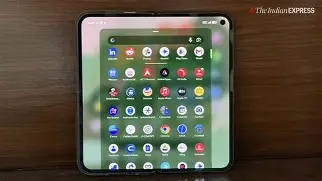
6. Carrier and Compatibility
Ensure carrier support for advanced features like 5G bands, Wi‑Fi calling, and eSIM if the user plans to use dual profiles. Check unlocked vs. carrier-locked variants for flexibility when traveling.
Troubleshooting and Maintenance Tips
Occasional issues may arise with foldable devices; here are practical troubleshooting steps:
- If the display shows lines or touch inconsistency near the crease, reboot the device and check for software updates. If issues persist, contact authorized service—do not attempt to pry the device open.
- For reduced battery life after an update, check battery usage in settings to identify apps with excessive background activity and toggle battery optimization for them.
- If apps behave oddly when switching displays, clear the app cache or reinstall the app. Ensure the app is updated to a version optimized for foldable displays.
- Maintain a regular backup routine—use cloud backup for photos and important documents to avoid data loss if repair is necessary.
Real-World Use Cases
Here are several scenarios illustrating how the Pixel 10 Pro Fold performs for typical buyers:
Remote Worker
A remote worker can keep email and chat apps open on one side while drafting documents on the other. The larger display reduces context switching compared with toggling apps on a single-pane phone, boosting efficiency for multi-app tasks like client calls with note-taking.
Content Creator
Photographers and social creators can use the inner display as a preview screen or editing canvas. The device’s computational photography makes low-light shots more usable, while the open form factor helps frame content for product photography and short-form video.
Frequent Traveler
Travelers who use maps, tickets, and media on flights will benefit from the big screen for entertainment and itinerary management. Folding to a compact size helps with storage in pockets and small bags during transit.
Conclusion
The Google Pixel 10 Pro Fold offers a compelling blend of Pixel software polish and a flexible form factor that satisfies buyers who want a device that functions as both phone and small tablet. Setup is straightforward: prioritize updates, configure the fold-specific settings to match usage patterns, protect the device physically, and optimize battery and camera workflows. While foldables remain a premium purchase with some trade-offs—weight, cost, and hinge-care considerations—the increased productivity and immersive media experience can be transformative for the right user.
By following this guide, new owners should feel confident that their Pixel 10 Pro Fold is set up for reliable daily use, protected against common risks, and configured to deliver the best balance between performance, battery life, and convenience.